


MODBUS RTU NEMA34 Integrated Stepper Motor
Multi-turn Absolute Encoder, 4096 line Encoder 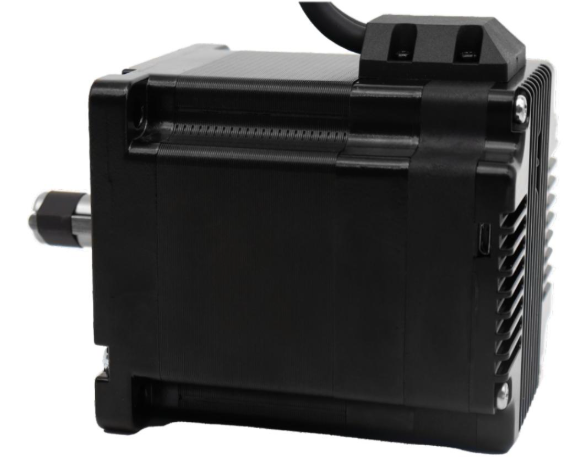
The IM34ET Series Integrated Motors represent a perfect integration of stepper drivers and stepper motors, combining the technologies of both in a single unit. They are fully compatible with 1599-revolution mechanical absolute encoders, which not only save installation space but also streamline wiring connections. By reducing your design and production costs, they stand as the premier choice for your stepper system solutions.
Frame Size: NEMA34
Holding Torque: 4.5–12.5 N·m
Supply Voltage: 18–70 VAC
Supported Protocols: Modbus/RTU, RS485
Built-in Programmable Multi-Turn Feedback: 1599 revolutions; supports user-defined home position with memory, no sensor required
Software Limit Function Supported: More reliable than mechanical limit switches
Closed-Loop Control: 4096-line (16384 counts) encoder feedback
Torque Modes Supported: Homing on collision, constant torque, object gripping
Input Compatibility: 5–24 VDC; Output: Open-collector (OC) output, withstanding voltage up to 30 VDC
Comprehensive Protection Features: Over-voltage, under-voltage, over-current, winding open-circuit, and position deviation protection
Non-Volatile Memory: Configuration parameters stored in the on-chip FLASH of the MCU
Wide Filter Frequency Range: 50 kHz–5 MHz adjustable, factory default at 300 kHz
User-friendly PC interface with full-featured functionality
Motor Parameters
| Model No. | Length L (mm) | Total Length (mm) | Shaft Length (mm) | Shaft Dia. (mm) | Phase Current (A) | Resistance (Ω) | Inductance (mH) | Holding Torque (N.m) | Inertia (g.cm²) | Weight (g) |
|---|---|---|---|---|---|---|---|---|---|---|
| IM3445 | 78.1 | 102.6 | 32 | 14 | 6 | 0.37 | 2.8 | 4.5 | 1800 | 2200 |
| IM3465 | 98.6 | 122.1 | 32 | 14 | 6 | 0.45 | 4.0 | 6.5 | 2800 | 3000 |
| IM3485 | 117.6 | 142.1 | 32 | 14 | 6 | 0.59 | 5.5 | 8.5 | 3600 | 3700 |
| IM34125 | 156.1 | 180.6 | 32 | 14 | 6 | 0.679 | 8.2 | 12.5 | 5400 | 5500 |
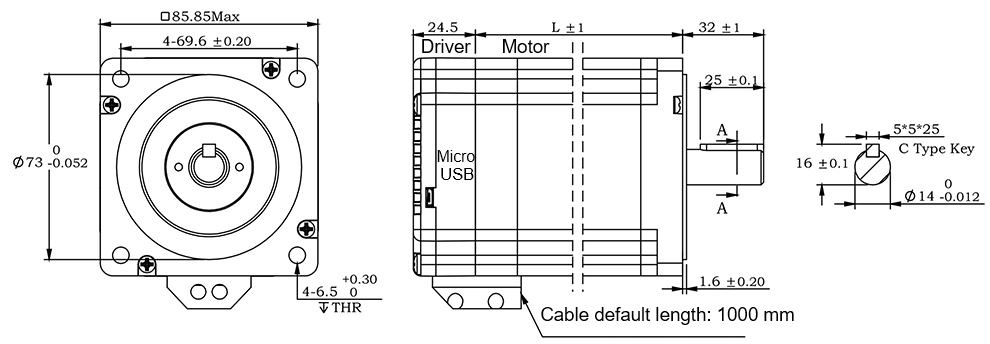
RS485 Multi-turn Absolute Encoder type Integrated Stepper Motor
Terminal Definition
| Terminal | Color | Name | Description |
|---|---|---|---|
| 1 | Red | V | 24~100VDC(or 18-70VAC) |
| 2 | Black | V- | GND |
| 3 | Yellow | X com | COM /VCC COM, compatible with 5–24 VDC |
| 4 | Yel/BLK | X0 | 3 Programmable Inputs (Active Low) Port functions configurable via commands or host computer. Pulse Mode: X0 = Pulse, X1 = Direction |
| 5 | Blue | X1 | |
| 6 | Blu/BLK | X2 | |
| 7 | Green | Y2 | Y0: Default alarm output, Normally Closed (NC), Y1: Default position reached output, Normally Closed (NC) Y2: Undefined,Users may configure or redefine the functions of the corresponding ports via commands. Y2 can be customized to input X3 upon request before delivery; it defaults to an output port. |
| 8 | Gre/BLK | Y1 | |
| 9 | Purple | Y0 | |
| 10 | Pur/BLK | Y com | COM GND |
| 11 | Orange | 485A | RS485 Communication port, default baud rate is 115200 |
| 12 | Ora/BLK | 485B |
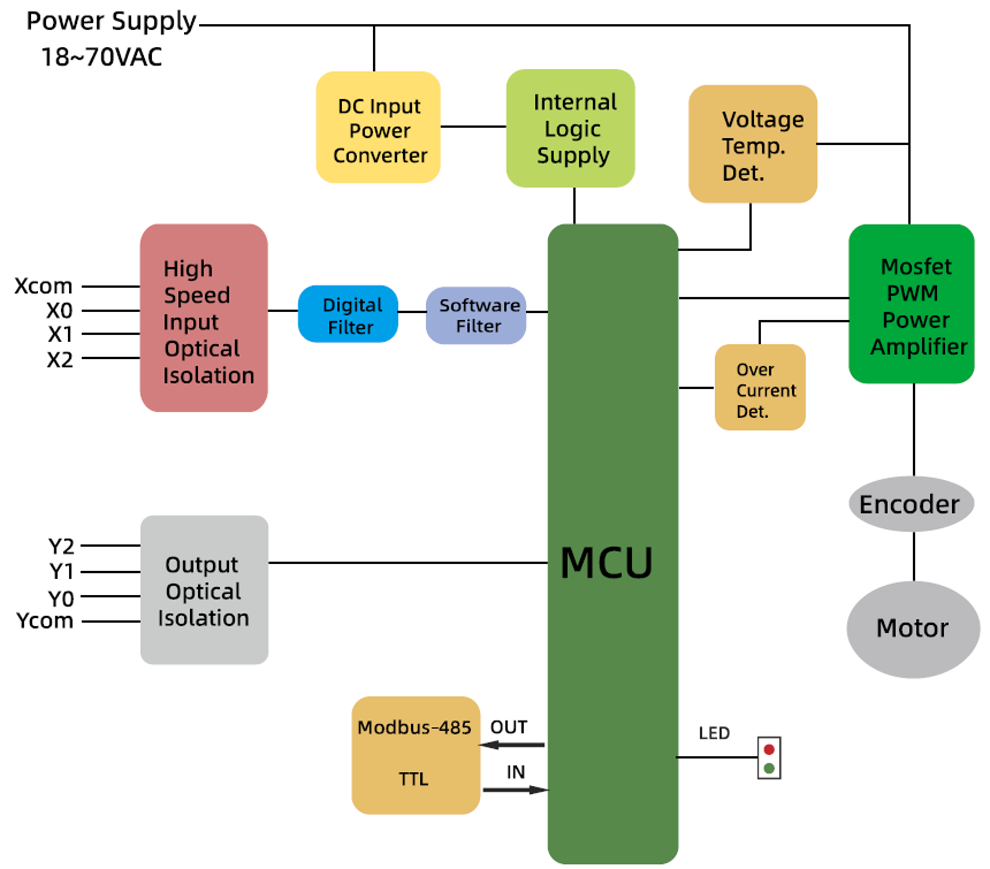
3-channel isolated digital signal input, the function of each input channel can be configured via software or commands, with the correspondence between input signals and functions as follows:
| Signal | Interface | Function |
|---|---|---|
| X0 | X0,Xcom | • General Input (Default) • Pulse / Limit / Home / Emergency Stop / Speed Switch / Interrupt Positioning / Forward Rotation |
| X1 | X1,Xcom | • General Input (Default) • Pulse / Direction / Limit / Home / Emergency Stop / Speed Switch / Interrupt Positioning / Reverse Rotation |
| X2 | X2,Xcom | • General Input (Default) • Limit / Home / Emergency Stop / Speed Switch / Interrupt Positioning |
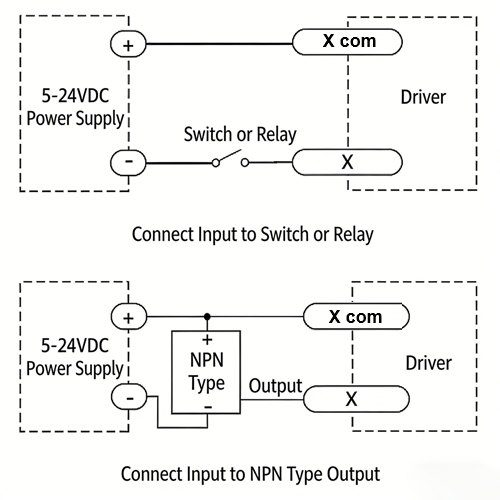
XCOM is the common positive terminal for single-ended input signals and shall be connected to the positive pole of the power supply.
It only accepts sinking NPN signals.
The figure below illustrates the typical wiring configurations for the X0–X2 input ports.
3-channel isolated digital signal output, the function of each output channel can be configured via software or commands, with the correspondence between output signals and functions as follows:
| Signal | Interface | Function |
|---|---|---|
| Y0 | Y0, Ycom | • Alarm Output (Default) • Alarm / Position Reached / Running Status |
| Y1 | Y1, Ycom | • Position Reached Output (Closed Loop Default) • Running Status Output (Open Loop Default) • Alarm / Position Reached / Running Status |
| Y2 | Y2, Ycom | • General Purpose Output (Default) • Alarm / Position Reached / Running Status |
The figure below illustrates the typical wiring configurations for the Y0–Y2 output ports.
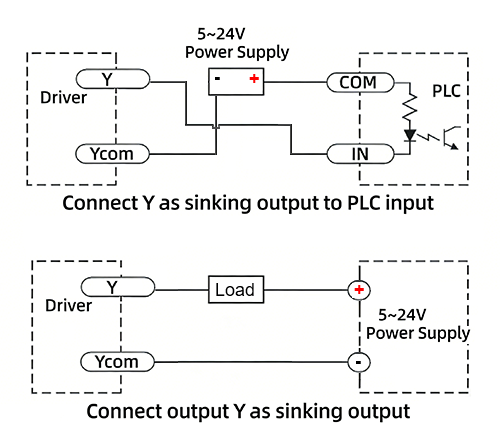
Warning: Output terminal → DC voltage < 30V, Inflow current ≤ 50mA.
CRC Check Routine (C#)
UInt16 Funct_CRC16(unsigned char * puchMsg, UInt16 DataLen)
{
UInt16 i,j,tmp;
UInt16 crcdata=0xFFFF;
for(i=0;i<DataLen;i )
{
crcdata=(*puchMsg)^crcdata;
puchMsg ;
for(j=0;j<8;j )
{
tmp=crcdata&0x0001;
crcdata=crcdata>>1;
if(tmp){
crcdata=crcdata^0xA001;
}
}
}
return crcdata;
}
RS485 Integrated Stepper Motor Commissioning and Control Software:
Modbus Poll 
New Software in google drive 
Github Project
Adampower

Quick Start Guide – Follow the steps below:
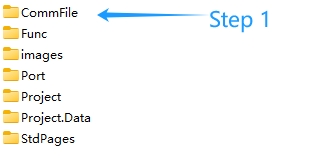
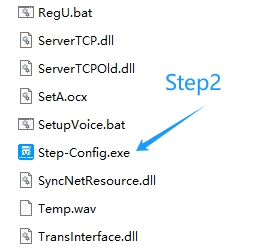
1. Extract the zip file, open CommFile folder and Click Step-Config.exe or Adampower.exe
2. Open Project.

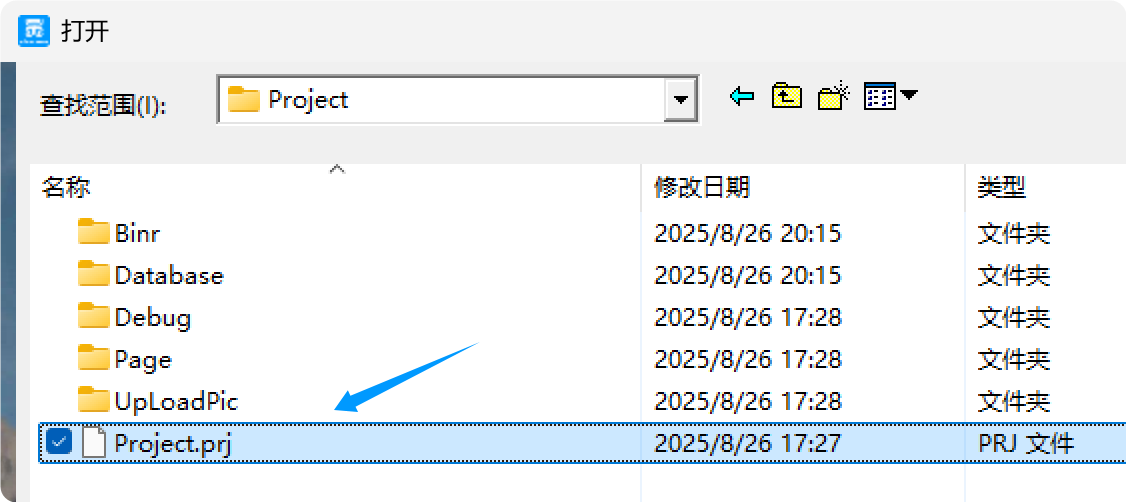
3. Click Browse
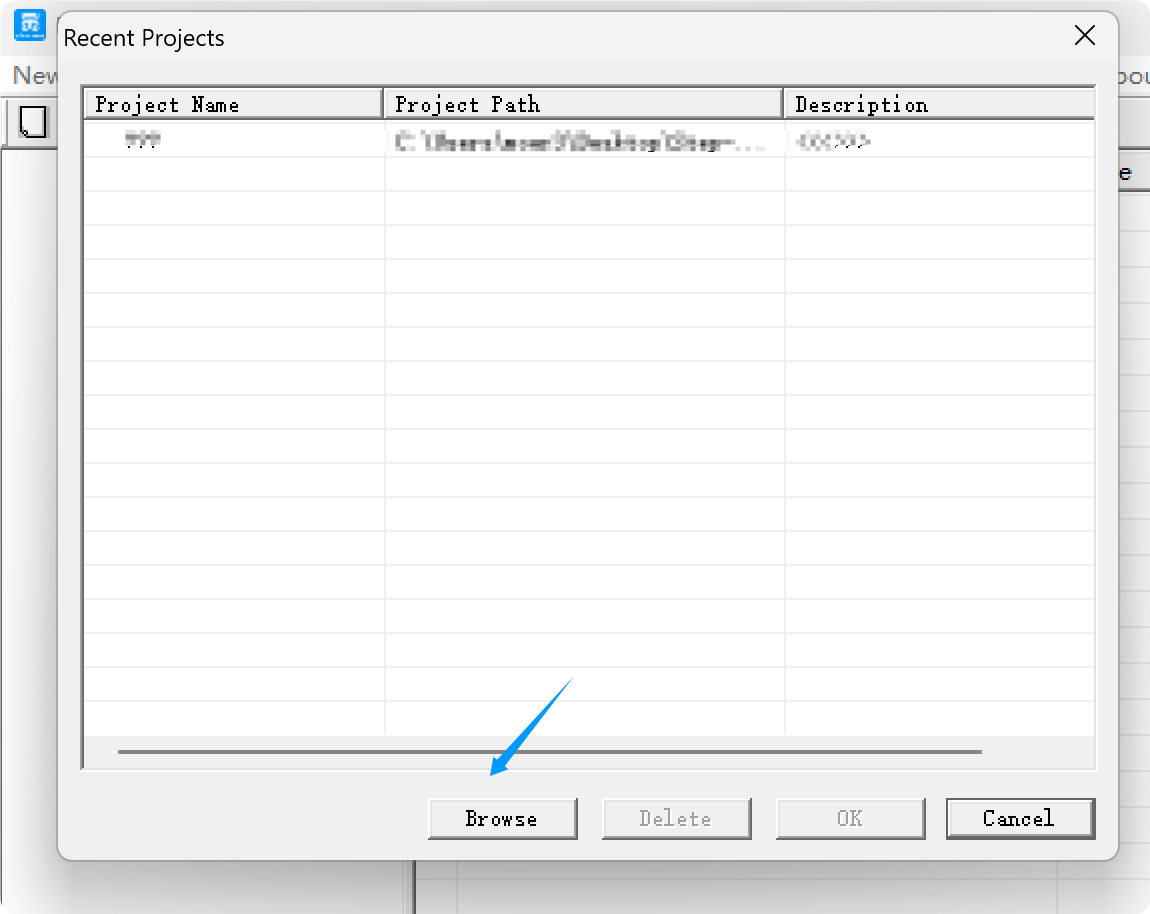
4. Select the Project.prj in the Project folder, in the same path as CommFile.
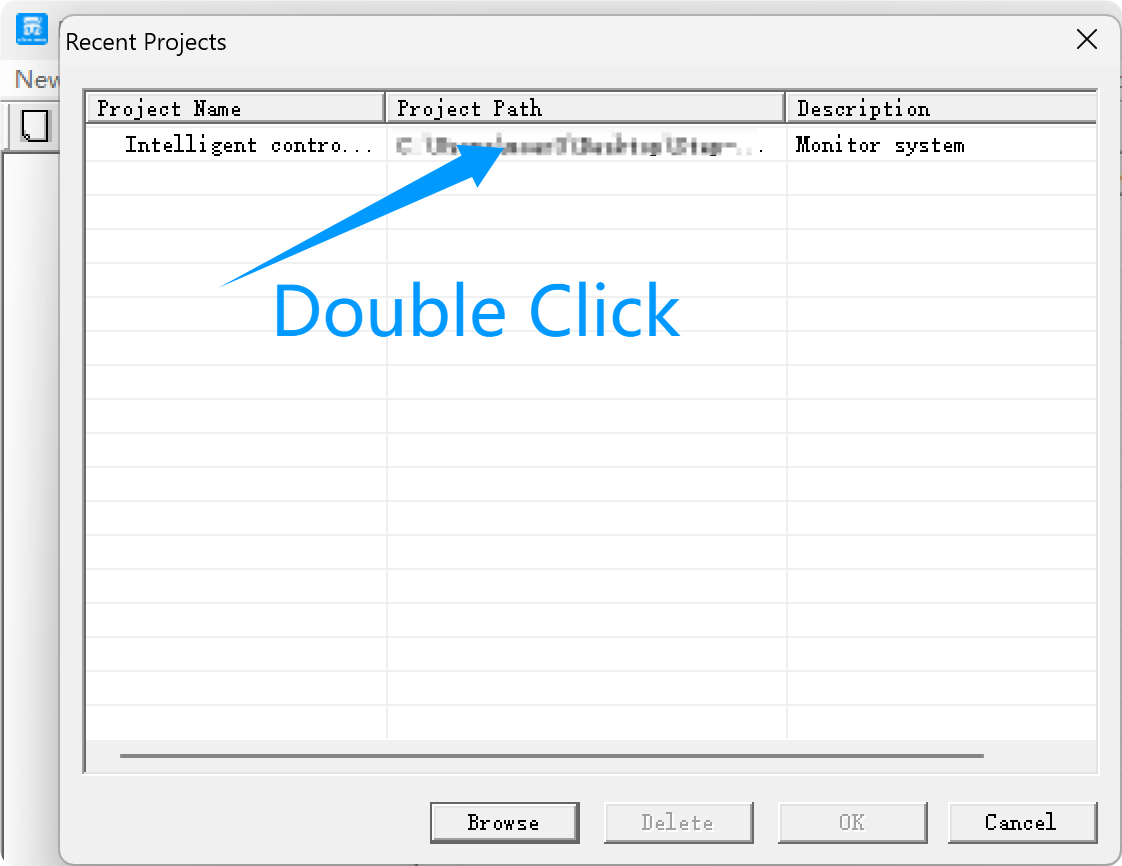
5. Double Click the Project.prj path
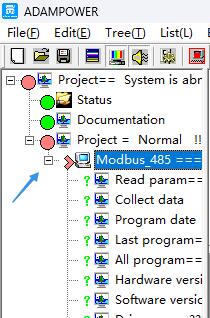
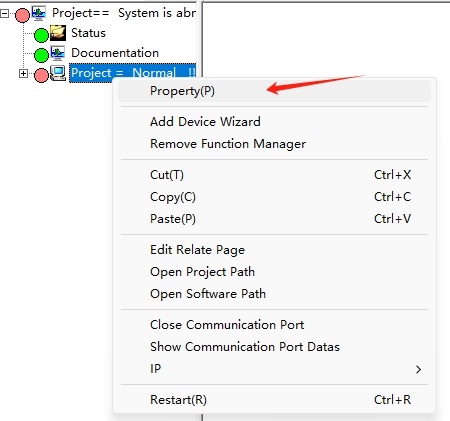
6. Right Click Modbus_485, and Click Property:
7. Click Property ComNN, Choose COM port, Baud rate and click Save and OK.
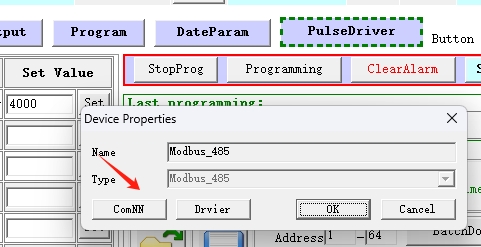
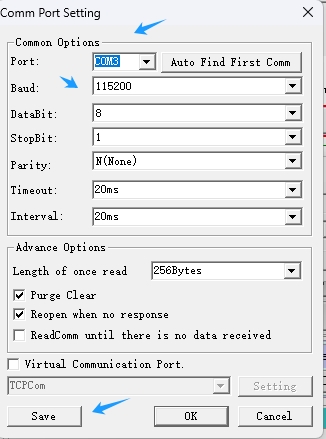
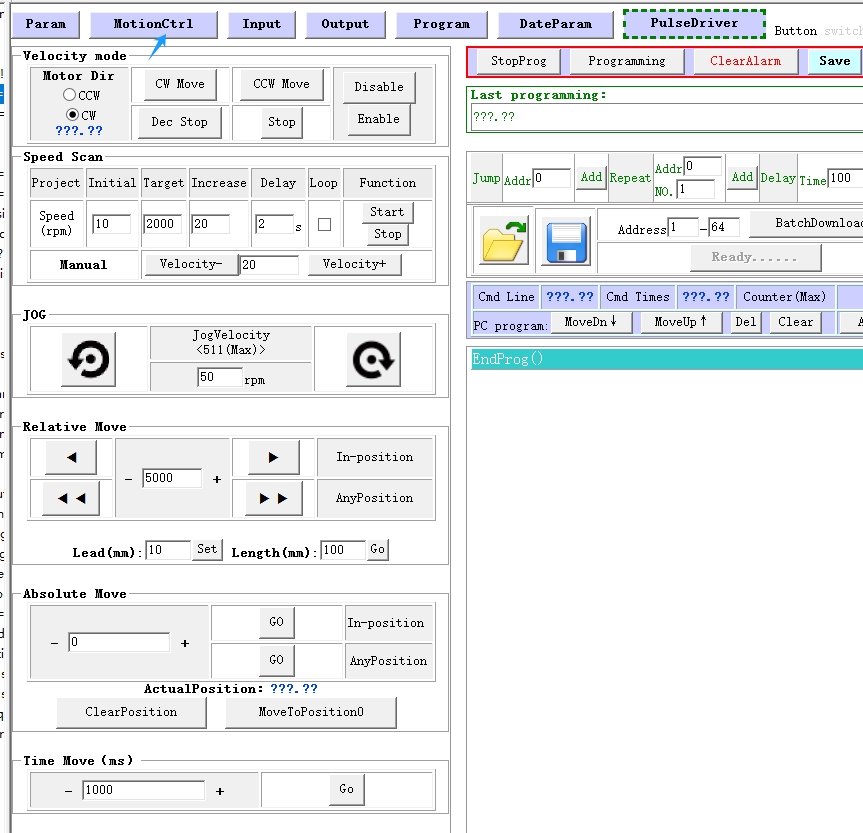
8. Start to use software control the RS485 Integrated stepper motor by below buttons:

Optional: USB-TTL debugging cable
RS485 Stepper Motor Controller Commands Manual 
LED indicator and status:
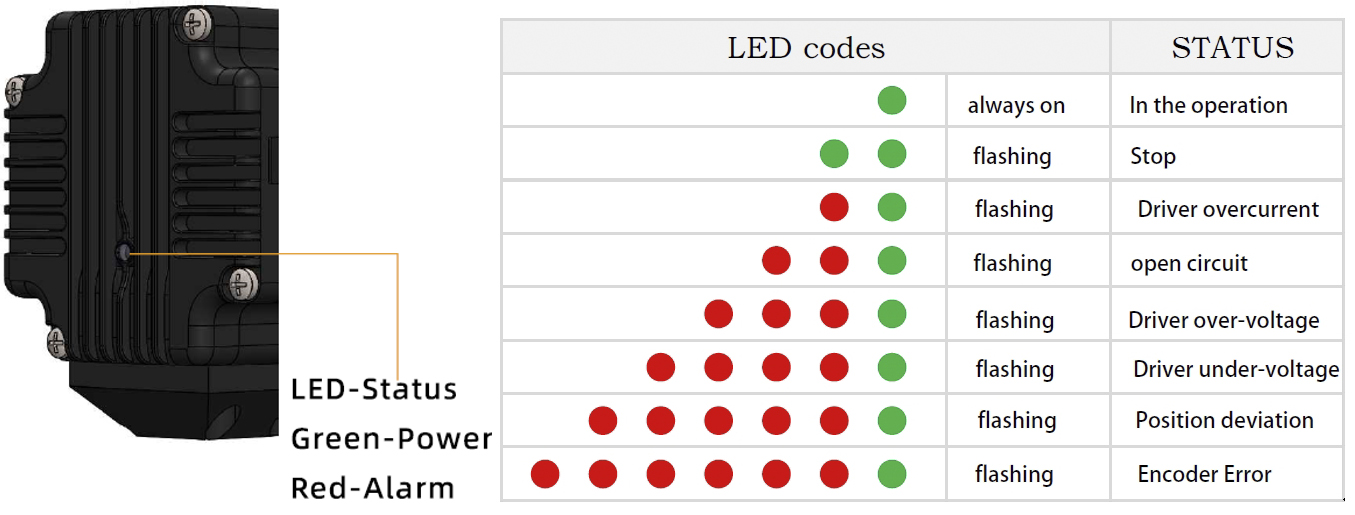
more Information on detail, please feel free to contact me 
- Availability: In Stock
- Model: IM34ET
- Brand: Adampower